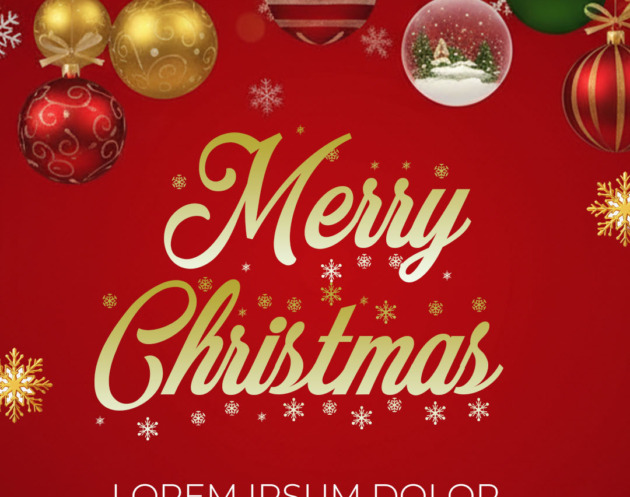
The best way to send warm holiday wishes to clients, family, or friends is with a custom-designed greeting. If you’re searching for “Tarjeta de navidad editable en psd,” you need a template that offers maximum creative control and professional quality. We provide a premium PSD (Photoshop Document) template, structured with organized layers, allowing you to use Adobe Photoshop to personalize every detail—from photos and text to holiday colors—ensuring your message stands out this Christmas season.

¿Por qué elegir una plantilla editable PSD? (Why Choose an Editable PSD Template?)
Our bank specializes in assets that offer superior flexibility and quality. Choosing a PSD format over simpler online editors ensures:
- Layered Control: Every design element, text, and effect is on a separate, editable layer, giving you total freedom over the final look.
- Maximum Resolution: PSD templates are set up for high-resolution output, perfect for professional printing or high-definition digital sharing.
- Industry-Standard Quality: Editing in Adobe Photoshop guarantees precision and access to advanced tools for shadows, blending, and color correction.
Note: To successfully edit and use this template, you must have Adobe Photoshop installed on your computer.
Características principales de esta plantilla PSD (Key Features of This PSD Template)
This specific Christmas card template is designed to be versatile and elegant:
- Festive Design: Features classic holiday elements and layouts suitable for both corporate greetings and personal messages.
- Photo Placeholder: Includes a dedicated Smart Object layer for easy placement of family or company photos.
- Print and Digital Ready: Optimized dimensions and resolution for both mailing as a physical card and sharing across social media platforms.
Cómo personalizar tu plantilla PSD (How to Customize Your PSD Template)
Follow these simple steps to adapt your holiday card:
Descarga el Archivo (Download the File):
Download the compressed ZIP file containing your professional card template from our secure site.
Descomprímelo (Unzip It):
Extract the contents of the ZIP file. You will find the main .psd file and an essential text document (.txt).
Abre el archivo PSD (Open the PSD File):
Launch Adobe Photoshop and open the main .psd template file.
Instala la fuente (Install the Font):
Critical Step: The beautiful, festive fonts used in this template are not included in the download. Open the included .txt document; it contains the external links necessary to download these fonts. You must install these fonts on your system before opening or editing the text layers in Photoshop. For help with the installation process, please watch this video tutorial, ensuring the link opens in a new tab:
Click here for the font installation video tutorial (Opens in a new tab)
Edita las capas y textos (Edit Layers and Texts):
Use the Layers panel to locate and select the text layers (e.g., “Happy Holidays”) and replace the placeholder text with your personalized message, company name, and year. Use the Smart Object layer to insert your photo.
Guarda y exporta (Save and Export):
Save the final edited design as a new .psd file, and then export it as a high-resolution JPG or PDF (for printing).
Consejos (Tips)
- Personal Touch: Replace the placeholder photo with a high-quality, relevant image of your family, team, or product.
- Color Alignment: Adjust the background or accent colors to match your brand identity or favorite holiday theme (e.g., modern metallic or rustic greens).
- Keep it Brief: Since it’s a card, keep the written message sincere, concise, and focused on goodwill.
Preguntas frecuentes (FAQ)
Q: Can I edit the PSD template using GIMP or similar free software?
A: To guarantee the integrity and proper display of all layers and effects, this professional template requires Adobe Photoshop for editing.
Q: I received a missing font error. What do I do?
A: You must close the file, download and install the fonts linked in the accompanying .txt document, and then reopen the PSD file in Photoshop.
Q: Is the card sized for standard mailing envelopes?
A: Yes, the template is set to standard card dimensions, but we recommend confirming the final crop size with your chosen print provider before ordering.
Llamado a la acción para editar (Call to Action)
Stop sending generic greetings! Download our Tarjeta de navidad editable en PSD today and create a truly memorable holiday card using Adobe Photoshop.
[DOWNLOAD YOUR CHRISTMAS CARD PSD TEMPLATE NOW]